The Free-Format Multi-Method Touch Editors
Beltower offers three types of Multi-Method Touch:
Spliced, Mixed and Generic,
which can be used interchangeably.
It also allows
Mixed Stages (eg. Triples and Major) within the same touch.
They can be edited (with an unlimited number of methods and including method change
at half-lead, part-lead or rounds (for mixed)),
rung, proved, analysed, listed, printed etc.
Beltower can accommodate virtually every type of notation.
Shown here are some of the more advanced examples.
Calling Positions
Screen Shot 1: a peal of Spliced Surprise Major
,
shows a peal imported from the
complib composition library, in spliced mode,
using column headers, including named blocks, with a repeat insertion.
It also shows a long touch name and the course heads listing
(where the tenor is at home, with the treble and repeated back bells omitted).
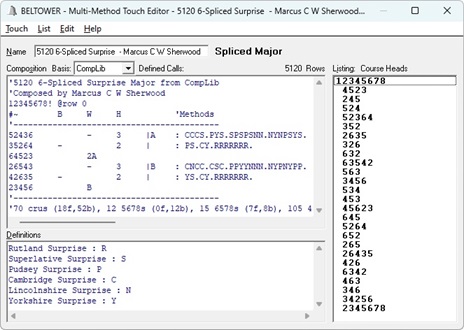
The methods, under Definitions, can be easily selected through the Touch menu,
typed in manually or added automatically from selectable defaults.
Screen Shot 2
shows
Mixed Methods
and
Mixed Stages using calling positions and column headers.
This illustrates different conductors (3 for Triples and 4 for Doubles)
each calling themselves into the hunt and out at 2.
It also shows the call heads listing (without plain leads but with the lead/event count),
and optional dashes for Bobs.
The defined calls are updated as you move the cursor, as shown here with the cursor on Grandsire Triples.
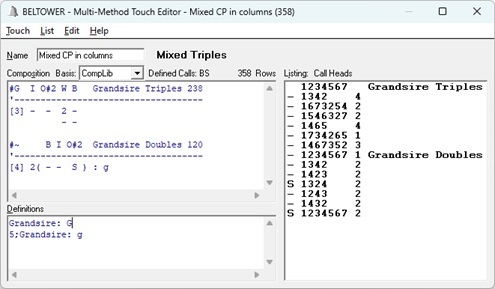
It will automatically stop (That's All) at rounds, where it comes round naturally, part way through a lead
(eg. at a snap lead, hand or back stroke), and you can call Rounds here as well, where there is no jump change.
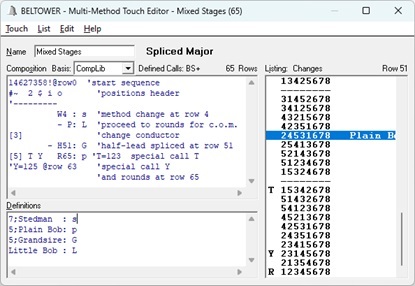
Screen Shot 3
shows
T and Y Special Calls, Splice at part-lead and Rounds
This shows touch-specific T and Y calls with their definitions,
Hnn, Wnn, P and R as the last call on each line signalling a method-change at a Half-lead, a roW
and where it comes round at Part-lead, plus a final call of Rounds.
Call Events (Lead Ends)
Mixed and spliced touches can be entered on Call Events Basis, in a similar fashion,
as illustrated in
Free-Format Touch Editor,
but with method IDs as illustrated above.
Generic Touches
Some callings can be used with a variety of methods, all of which can be included under Definitions,
and by simply changing the method ID, as shown above,
either in the header for Grandsire Triples (#G) or on the end of each touch line (: g) for Grandsire Doubles,
or alternatively in the Definitions,
a touch can easily be applied to a different method.
 BELTOWER