 BELTOWER BELTOWER
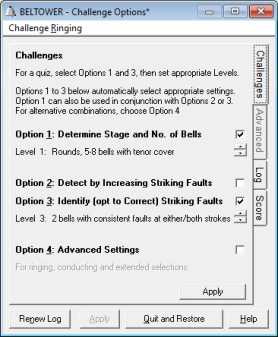
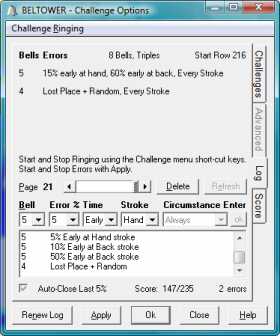
Listening ChallengeYou can choose Random Stages and/or Striking Faults, each with a choice of difficulty levels. OptionsOption 1 offers Random Stages (numbers of working bells) and Numbers of Bells (including tenor cover when appropriate). You also have the choice of either Diagnosing or applying Corrections to the striking faults, through Options 2 or 3. Difficulty LevelsThe difficulty levels for random stages (now 12 options) encompass Rounds, Random Sequence (Call Change), Plain Hunt or Method, with and without a covering tenor. The difficulty levels for striking faults include a single bell either early or late in selected/random degrees, through to 2 bells with added method errors (falling off the line). Screen Shot 1shows the Listening Challenge options and difficulty levels.Fault DetectionStriking faults are created automatically and you enter your diagnosis in the Log. Option 2, Detect, starts you off with small faults, and you can increase their size to make them easier to hear. With Option 3, Identify, you start off with random faults as a quiz, but a single user can aim, bit by bit, to reduce all the faults to zero. Diagnosis and CorrectionIn the Log tab, you enter your diagnosis. Only the bell and early/late are required at level 1, but at the higher levels it gets harder, including hand/back stroke, the degree of error and the circumstance. And the faults can be revealed at any time at the press of a button. Combine striking faults with plain hunt or methods at random stages and you can raise the game to extremely challenging levels. Ringing can be controlled from within the Challenge dialog, making it particularly useful for a tower quiz or listening practice. ScoringScores are awarded for correct entries depending on the complexity of the faults, your accuracy/improvement, the number of incorrect entries and the time taken. Screen Shot 2shows the fault Log with the Diagnosis and Adjustment controls for Option 3. |
  | |
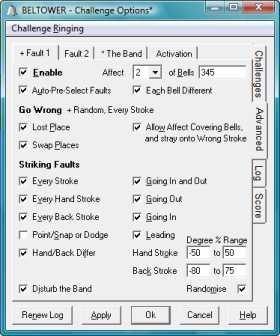
Ringing and the Conducting ChallengeAdvanced Settingsallow detailed access to all of the striking faults mentioned above, plus others particular to conducting.Striking faults can be introduced with a choice of fault types, applied to a variety of bells, and they can be automatically pre-selected, from your chosen options. It can also ring random numbers of bells, within your chosen range, odd and/or even, and optionally, with a covering tenor. Challenges can be started either immediately, manually or (random) automatically. You can then try to identify which bell(s) and which type(s) of fault. Conducting:In addition to the striking faults, method errors can be generated, from selected options, to test your conducting skills.Faults and method errors can be started either manually or automatically, during normal ringing and calling, so that you could be a random way into a touch before a bell goes wrong. To make it more authentic, different striking inaccuracies can be applied to the rest of the band, which can also be further disturbed when the bells go wrong. You can then try to identify which bell(s) went wrong, what they should have been doing and how to put them right, either paused or without stopping ringing. Then you can restore correct places and striking, with a single key-press, ready for the next fault. Screen Shot 3shows the Advanced options available with Fault 1 and Fault 2.The Logrecords your key-presses as well as the actual faults, for comparison, rather like Screen Shot 2 above. If you wish, you can trip through different faults, as they happen, without leaving the Fault Log, and then, with the scrollable changes listing and/or the striking recordings (play-back and display), you can listen again and review the faults. |
 |
