The Composer and Build Editor
The Composer will generate touches according to selected criteria,
including repeated parts, special calls, the conductor, and the methods and calls to be used.
To accomodate date-touches, it can create X and Y calls of up to 3 rows,
including nested parts,
by calling position for selected conductor,
+/-parts,
all rotations,
unlimited touch lengths,
spliced with mixed lengths/events/stages,
repeated parts with no selected calls (spliced),
using methods with no defined calls or multiple call events,
start@row,
plus keep hunt bells and tenors home at mixed stages.
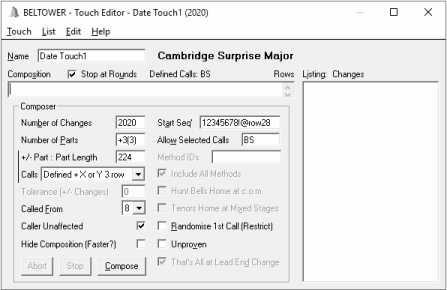
Screen Shot 1
shows the settings used in the Composer for the 2020 touch,
shown in Screen Shot 1 in the
Free-Format Touch Editor.
Build View
(
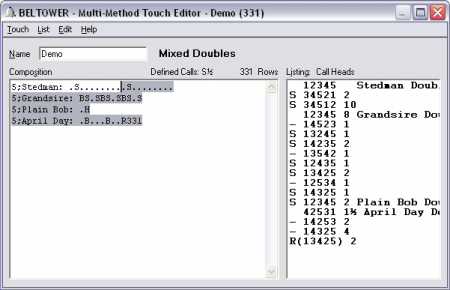
Screen Shot 2
)
shows native code in the Multi-Method Touch Editor
enabling you to practise ringing starting part way through.
It also illustrates the Call Heads listing (lead heads but with plain
leads omitted) and the cursor on Stedman with the defined calls indicated, the
H at the end of plain bob to indicate a half-lead method change, and finally,
the R 331 at the end of April Day to call it round early.
 BELTOWER