icon  BELTOWER

    Sound, Calling, Sensors and Preview

   Previous     Next     You are here:   Home -> Simulator -> Here

Choice of Bell Sounds and Voices


There is a choice of sounds for tower or hand bells, normal or muffled, for hand strokes and back strokes, and provision for you to add your own voices and bell sounds, with adjustable pitch and volume.   There is also the option to output to MIDI (Musical Instrument Digital Interface) as well, with (since version 9) 127 sounds and all channels.

You can also adjust the pitch of all the bells, collectively, to match your tower or hand bells.

Manually Calling Touches and Call Changes


You can call your own call changes or Beltower can call random call changes, in addition to the pre-selected changes from the Call Changes Editor.

You can call your own touches, including spliced, and Beltower will remember the calling, so that you can review and/or edit it - handy when it doesn't turn out as planned.   You can also start a touch from call changes (manual, random or pre-selected) or you can start ringing part way through an existing touch.

You can choose when to enter your calls: either at (or about) the selected voiced call time or up to a whole lead before.

Calls can be voiced between 280% and 127% of a stroke before they take effect.   This allows calls to be timed at pull time 2 blows before, for use with tower bells, through to just before the lead strike 1 blow before, for hand bells.

External Sensors and Free Striking (silent practice) mode


You can input from sensors (dummy hand bells or tower bells) on any or all of the bells, or from a MIDI keyboard or other instrument, sounding the bells through your loud-speakers.   Set-up is simple, allowing selection of input mode, ports, pins, debounce time, bells, delays, switches, calls, bell/call re-assignment and more, all through a single dialog box.

Sensors should, normally, send signals via either a timer interface or a multi-bell interface box.   Signals applied to individual pins on the COM ports can (since v9.06) be detected on either of the rising or the falling edges.

Features:   There is now an option to Auto-Go after a selected number of strokes.   Co-operative speed lets a ringer change the speed dynamically, ringing while paused, and then resume, with the other bells fitting in automatically.   Co-operative timing allows the simulator to ring tenor behind, or even working bells, fitting in with the real ringers, or alternatively, you can ring all of the bells and let Beltower make the calls.   Free-strike mode allows you to ring bells and sound calls completely independently, with only the sounds coming from Beltower.   Your striking and calls can be recorded, re-played and displayed, and with free-strike the recording options are more automatic.

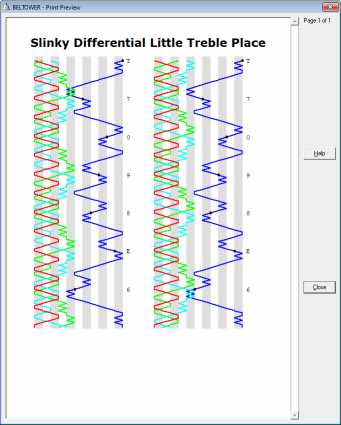
Blue Line Preview


This can show the current method, the current touch, and/or when ringing Spliced or Mixed, any of the included methods.

It can be reached from the Ring window, usually with a single click, and while ringing is paused.

Screen Shot 1:

  Shown here is a method with a 'little' hunt bell, two differential lines, and a blue line with its 'place bell' entry points.
Blue Line Preview

Valid HTML 4.01 Transitional
icon  BELTOWER

    Sound, Calling, Sensors and Preview

   Previous     Next     You are here:   Home -> Simulator -> Here